ClawDance: AI Video Generator
- 4.7
- Rating
- 10.00K
- Installs
- Free
- Price

 Analysis by App-foxy
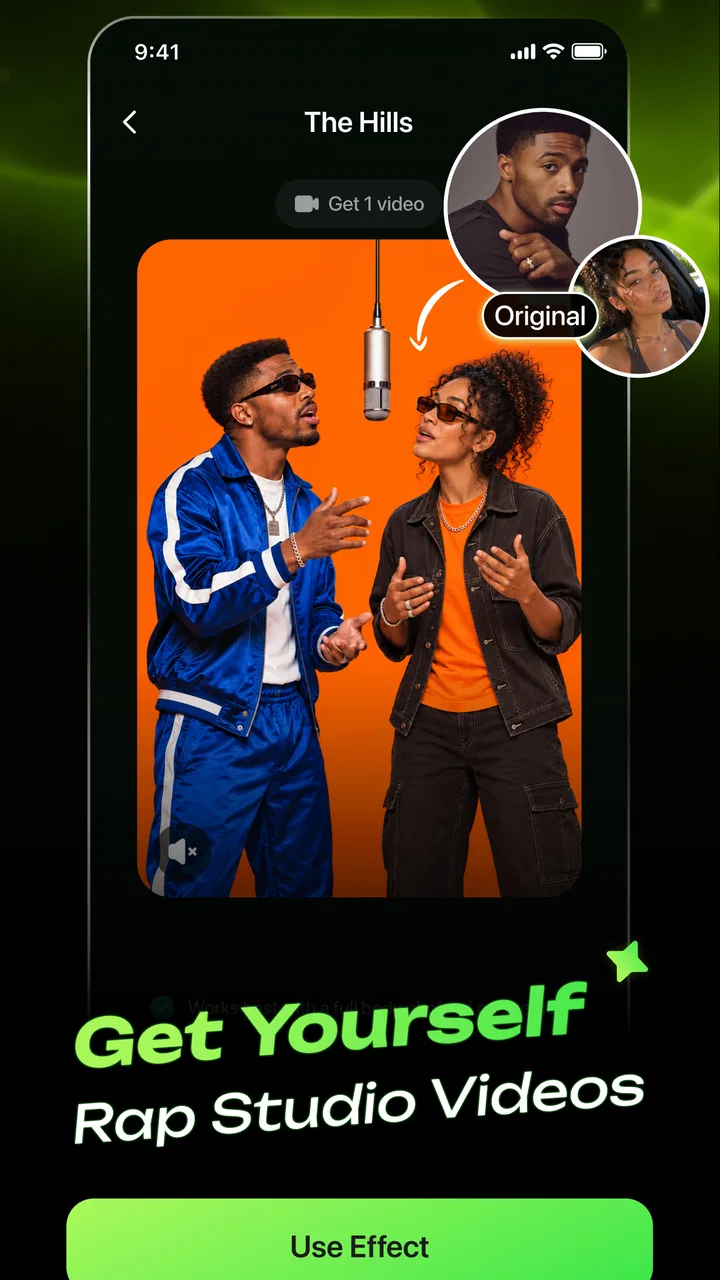
ClawDance: AI Video Generator caught my attention because it turns a familiar photo-editing idea into something more playful: instead of only adjusting color, cropping, or adding filters, I can use an image as the starting point for a short AI-created video. The first session feels approachable, especially if I want a quick social post rather than a full editing project. It is a free photography app from iKame Applications - Begamob Global, rated for Everyone, and its 4.7 average from around 1.6 thousand ratings suggests that the simple concept has connected with many early users.
My first impression was that the app is built for experimentation rather than careful filmmaking. I would open it when I had a photo that felt static and wanted to see whether animation could give it a little personality. That makes it easy to recommend to someone who enjoys trying new creative tools, but it also raises an important question: once the novelty wears off, will there be a reason to return every month? My answer is cautiously positive, although the value depends heavily on how often you share visual content and how much control you expect over the result.
What the first week feels like
The strongest part of the first week is the low barrier to entry. I do not need to approach the app like a video editor with a timeline, layers, and a long list of technical settings. The central appeal is much more immediate: choose a suitable image, let the AI generate movement, and decide whether the result is worth keeping. That short loop makes the app feel less intimidating than conventional mobile video software.
You May Also Like

 AccuWeather: Weather Radar
AccuWeather Review: A Quick, Clear Forecast for Everyday Decisions
For everyday plans, the best forecast is the one you can understand quickly. AccuWeather makes rain timing, radar, and local conditions easy to act on, with a few trade-offs.

 Hill Climb Racing
Why Hill Climb Racing Still Turns Crashes Into One More Run
A tiny car, a bumpy hill and one more upgrade: Hill Climb Racing keeps resurfacing because its simple chaos makes every near-miss feel personal.

 AliExpress - Shopping App
AliExpress Makes Global Shopping Feel Personal, but Shoppers Bear the Risk
AliExpress turns a global marketplace into a pocket-sized discovery engine. Its reach is useful, its shopping loop compelling, and its trade-offs easy to miss.

 Lords Mobile: Kingdom Wars
Lords Mobile Is a Kingdom-Building Routine, Not a Quick Match
A case-by-case verdict on the building, battles, device demands, and social commitments that make Lords Mobile rewarding for some players and exhausting for others.

 PDF Scanner app - TapScanner
TapScanner Makes Paperwork Easier to Capture, Check, and Share
TapScanner makes scanning with a phone feel less like a rescue operation and more like a dependable step in getting work done. Its capture tools are useful, though not flawless.

 Block Blast!
 Shows How Much a Puzzle Game Can Leave Out
A quiet grid game shows why puzzle players increasingly value instant clarity, repeatable skill and low-pressure play—and where the genre still needs to catch up.
More From Our News Desk
View All News


I found the best early results come from treating the source photo as a design decision, not an afterthought. A clear subject with enough visual separation from the background gives the animation a better chance of looking intentional. A crowded image, a group shot with overlapping faces, or a picture with very little contrast can make the generated movement feel less convincing. This is one of the first useful habits I would develop: prepare a small folder of strong images before opening the app, rather than testing random pictures and blaming the generator for every weak result.
The app is particularly appealing for casual social posts. A holiday picture, a pet portrait, a product snapshot, or a simple outfit photo can become more noticeable when it has motion. I would not use it to replace a proper camera workflow, but I can see myself using it when I want to post something quickly and do not have time to record new footage. The difference is not just convenience; it changes the kind of content I can make from images already sitting on my phone.
Another advantage during the first week is the sense of discovery. AI animation tools invite repeated attempts because small changes in the source image can produce noticeably different impressions. That makes a short testing session entertaining. I might begin with one portrait, compare it with a wider shot, and then try a more graphic image with strong shapes. The process is closer to visual sketching than to traditional editing, which is exactly why it can feel fresh.
Still, I would set expectations early. The app’s store summary focuses on creating viral videos with an AI generator and making animation and editing simple. In practice, “simple” should be understood as a streamlined creative route, not as a guarantee that every output will look polished or become popular. AI-generated motion can be fun without being perfectly natural. If I needed precise timing, carefully directed camera movement, clean transitions, or frame-by-frame control, I would reach for a more established video editor instead.
The current version is 1.3.1, and the app supports devices running Android 7.0 or later. That broad compatibility is useful for people who do not own a recent phone, although AI video work can still feel more comfortable on newer hardware. The experience is likely to be more enjoyable when I have enough storage and patience for processing, especially if I am testing several ideas rather than making one quick clip.
Choosing images that survive repeated experiments
A practical workflow is to begin with three different image types: one close portrait, one object or pet, and one wider scene. This gives me a better sense of where the tool fits my habits. Portraits are useful for expressive posts, objects can work well for small promotional experiments, and wider scenes help reveal whether the animation adds depth or simply makes the picture look busy.
I also prefer keeping the original image untouched. I make a copy or use an export specifically for the experiment, then compare the generated result with the source. That prevents a common mistake: accepting a flashy animation that is actually less attractive than the original photograph. The app is most useful when motion improves the image’s purpose, not when movement is added merely because it is available.
For a realistic everyday scenario, imagine preparing a birthday message for a friend. I could take a favorite photo, create an animated version, and share it as a more lively greeting without filming myself or learning a complicated editor. That is a genuine use case because the goal is modest: make one personal post feel different. I would not need a large library of effects or a professional export pipeline to get value from the app.
Does it remain useful after the novelty fades?
The month-to-month value depends on whether I have a recurring reason to turn still images into short videos. For a frequent social media user, the app can become a quick idea generator. It may help break the routine of posting only static photos, especially when I want a lightweight format for announcements, mood boards, personal updates, or visual jokes. The more consistently I collect good source images, the easier it is to return with a clear purpose.
For someone who rarely posts, the value is less dependable. The first few experiments may be enjoyable, but an app centered on AI animation can become something I open only when curiosity returns. That is not necessarily a flaw; many creative apps are occasional tools. However, I would not install it expecting a daily editing habit unless I already make regular visual content.
The strongest long-term use I can see is repurposing existing photography. Instead of searching for a new idea every time, I can revisit pictures that were previously limited to a gallery. A small business owner might use it to give a product image more movement for a social post. A travel enthusiast could turn a landscape into a more engaging update. A family user could create a playful version of a memorable picture. These workflows are valuable because they start with material I already have.
There is also a useful distinction between inspiration and production. I would use ClawDance to discover a visual direction, then decide whether the result is good enough to publish. If it is not, the experiment may still show me what kind of movement suits the image. That makes the app more valuable as a rapid concept tool than as a complete replacement for every stage of video creation.
Compared with ordinary photo editors, the main difference is the emphasis on motion. A traditional editor is usually better when I need reliable retouching, precise cropping, color correction, text placement, or a predictable final image. ClawDance is more interesting when the question is, “How can I make this still picture feel alive?” Choosing between them is not about which app is universally better. It is about whether the task begins with improving a photograph or transforming it into a small video idea.
Compared with full mobile video editors, the trade-off is even clearer. A conventional editor gives me control and repeatability, while an AI generator gives me speed and surprise. I would choose ClawDance for a quick creative attempt and a timeline-based editor for a project where every second matters. If I were preparing a polished campaign, a tutorial, or a narrative clip, I would want more direct control than this kind of workflow is designed to provide.
Who gets recurring value from it?
I think the app is a good fit for people who enjoy visual experimentation, post frequently, or want to animate personal images without studying complex editing tools. It also suits users who judge success by whether a result feels fresh and shareable, rather than by whether it meets professional production standards. The Everyone age rating makes the concept approachable for a broad audience, though younger users should still make sensible choices about which personal photos they use in any creative app.
I would be more hesitant to recommend it to a photographer who wants exact control over the final image, a creator who needs consistent branding across many videos, or anyone who dislikes trial and error. It is also not the first choice for someone whose main need is basic photo correction. In those cases, a dedicated photo editor or a conventional video editor will probably provide more dependable value over time.
The free entry point makes trying it easy, but the presence of in-app purchases ranging from $9.99 to $89.99 per item changes how I would approach long-term use. I would begin with a clear personal limit and avoid treating every interesting generation as automatically worth paying for. The right question is not whether a single result looks impressive; it is whether the app is saving me enough time or helping me create enough useful content to justify continued spending.
Maintenance, repetition, and creative fatigue
The maintenance burden is fairly light in concept, but creative apps still require some personal organization. I would keep a small selection of source photos, delete failed experiments, and save only the versions I can imagine actually using. Without that discipline, the gallery can fill with near-duplicates, making the app feel less productive each time I return.
A helpful routine is to give each session a purpose before generating anything. For example, I might decide that I am creating one short greeting, testing a product image, or exploring a travel photo. This prevents the endless-scroll feeling that can come from generating variations without a destination. The app is more satisfying when it supports a communication goal instead of becoming a slot machine for random effects.
The main source of fatigue is repetition. Once I have seen several still images turned into animated clips, the basic surprise becomes weaker. If the results begin to look similar, I may stop opening the app unless I have a new photo or a specific post in mind. This is why the long-term value comes from the user’s image library and imagination as much as from the software itself.
Another possible frustration is the gap between expectation and control. AI tools can produce an appealing result quickly, but quick generation does not mean predictable generation. If I have a precise idea in my head, an unexpected motion choice may feel like a failure even when the output is technically interesting. I would handle this by choosing images that can tolerate interpretation and by accepting that some attempts are exploratory rather than publishable.
There is a second, less obvious trade-off involving authenticity. An animated version of a real photo can make an ordinary moment more engaging, but too much artificial movement may distract from what made the original image special. For personal memories, I would use the effect lightly and keep the original available. For promotional or attention-seeking content, I would be more willing to prioritize visual impact.
To avoid wasting time, I would use a three-step filter. First, ask whether the source image has a clear subject. Second, decide what the animation is supposed to add: energy, emphasis, humor, or atmosphere. Third, judge the result at normal viewing size rather than zooming in to admire technical details. If the clip does not communicate better than the still image, I would move on instead of endlessly refining it.
Questions I would ask before installing
One practical question is whether the app is suitable for an older phone. The Android requirement begins at version 7.0, so compatibility is broad. Even so, I would expect a smoother experience from a device with modern performance and sufficient free space. If my phone struggles with ordinary video playback or storage, I would keep my expectations modest and avoid planning a large batch of generations.
Another question is whether it can replace a complete editor. I would say no. I see it as a focused creative tool for turning images into animated ideas, not as my only solution for cutting footage, arranging a detailed sequence, or applying exact finishing touches. I would pair it with a standard editor when the final post needs more structure.
People may also wonder whether it is worth paying for. My approach would be to establish a repeatable free workflow first. If I regularly use the results and the available purchase meaningfully improves that workflow, spending may make sense. If I am only opening the app for occasional amusement, I would keep it as a free experiment and avoid assuming that more generations automatically produce better content.
A final consideration is privacy and photo selection. I would personally begin with non-sensitive images and avoid uploading anything I would feel uncomfortable processing through a creative service. That is a sensible habit for any app that works with personal pictures, especially when the image includes other people. The app can be enjoyable without requiring me to use the most private photographs in my library.
My long-term verdict
After the first-week excitement, ClawDance still has a place on my phone, but not as an app I would open automatically every day. Its lasting value comes from a specific strength: it gives ordinary photos a chance to become short, attention-grabbing visual pieces with relatively little effort. That is enough to make it useful for social posts, greetings, experiments, and occasional creative refreshes.
I would recommend it to a friend who wants a playful way to animate images and does not need professional-level control. I would explain that the best results require thoughtful source photos, a willingness to try more than once, and realistic expectations about AI-generated movement. I would also mention the purchase range before they become invested in repeated experiments, because a free installation does not necessarily mean every part of an ongoing workflow will remain free.
The app earns recurring value when I treat it as a spark rather than a full studio. It helps me find a quick visual idea, reuse photographs I already like, and make a post feel less static. It becomes less compelling when I expect precise direction, consistent output, or a complete editing system. In those situations, a more traditional tool is the better long-term companion.
With over 10 thousand installs and an Everyone rating, it is still an approachable choice for casual creators who want to test AI video generation without committing to a complicated production process. My final judgment is that ClawDance is worth keeping for occasional, purposeful creativity, especially if I regularly share photos. It does not completely overcome the repetition that can follow the initial novelty, but with a prepared image library and a clear reason for each session, it can remain a useful little part of a mobile photography routine.
FAQs for ClawDance: AI Video Generator
01What is ClawDance: AI Video Generator, and what can it create?
ClawDance: AI Video Generator is an AI-powered creative app designed to turn written prompts, images, or other user-provided ideas into short animated videos. Depending on the available tools and selected style, you can create dancing characters, social media clips, visual experiments, and entertaining motion content without traditional video-editing skills. Results can vary according to the prompt, source image, and processing options.
02How do I use ClawDance to generate an AI video?
After opening the app, you generally choose a generation mode, upload an image or enter a description, and select the animation or dance effect you want to apply. The app then processes the request on its servers and produces a video preview. Clear images with visible subjects usually work best. You may need to adjust the prompt or try another source image if the movement looks unnatural.
03Is ClawDance: AI Video Generator free to download and use?
The app may be available to download for free, but some generation features, premium effects, higher-quality exports, or faster processing can require in-app purchases or a subscription. Availability of free credits and pricing may change over time, so it is important to check the current store listing and the payment screen before confirming a purchase. Review any trial terms carefully.
04Can I use ClawDance videos on social media or for commercial purposes?
Videos created with ClawDance can usually be saved and shared for personal or social media use, but the exact rights depend on the app’s current terms of service, the assets you upload, and any music, templates, or AI-generated elements included in the result. Before using a video commercially, confirm the licensing conditions and make sure you have permission to use people’s images, logos, and copyrighted material.
05Is ClawDance safe to use, and what happens to uploaded photos?
Before uploading personal photos, review ClawDance’s privacy policy and permissions because image-generation services may send files to remote servers for AI processing. Avoid submitting sensitive documents, private images, or photographs of other people without consent. You should also check whether uploaded content is stored temporarily, used to improve the service, or deleted after processing, as these practices can change with app updates.
Pros
- Turns text prompts into short
- shareable AI videos.
- Offers creative effects for experimenting with visual ideas.
- Simple interface suitable for users without editing experience.
- Useful for making social media content quickly.
- Can inspire concepts when you need a fast visual starting point.
Cons
- AI results may vary noticeably between prompts and attempts.
- Complex scenes
- faces
- and movements can contain visual glitches.
- Video generation may require credits or in-app purchases.
- Processing times can increase during busy periods.
- Privacy terms should be checked before uploading personal images or videos.

ClawDance: AI Video Generator
Gallery